


































































































































An SPF record generator helps you create accurate SPF records to authorize legitimate email senders and protect your domain from spoofing, phishing, and unauthorized email activity. By simplifying DNS configuration and reducing syntax errors, it improves email authentication, strengthens domain security, and supports better email deliverability.
What an SPF Record Is and Why It Matters for Email Security
An SPF record is a DNS TXT record that tells receiving mail servers which systems are authorized to send email for your domain. SPF, or Sender Policy Framework, is a core part of email authentication because it helps mailbox providers verify whether a message claiming to come from your domain was sent from an approved source.
When a receiving server performs an SPF check, it evaluates the sending IP address against the mechanisms and DNS records in the SPF policy for the relevant MAIL FROM or HELO identity. This helps determine whether the sending server is authorized to send email using that identity.
For organizations that rely on cloud mail, CRM platforms, help desks, marketing automation, transactional mailers, and internal servers, SPF is essential for email security. A proper SPF record reduces the chance that attackers can spoof your domain in phishing campaigns. It also supports stronger DMARC enforcement when paired with DKIM, BIMI, and ongoing DMARC Reporting & Monitoring.
SPF in the broader email authentication stack
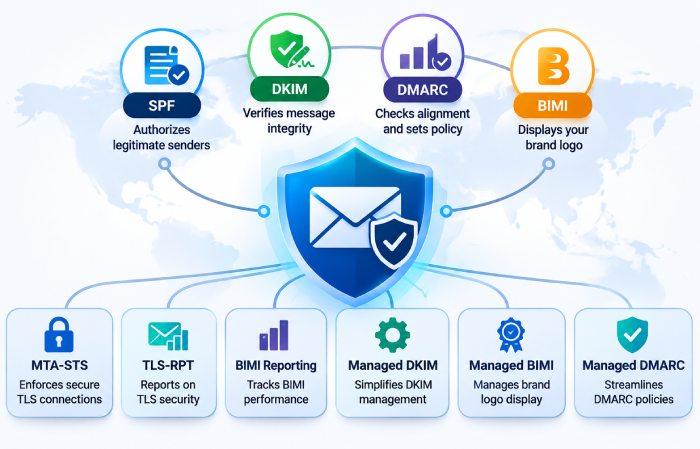
SPF is not the only control that protects a domain, but it is one of the foundations of modern email authentication. DKIM uses cryptographic signatures to verify message integrity and domain association, while DMARC checks SPF and DKIM alignment and provides instructions for handling authentication failures. BIMI builds on an established email authentication framework to help eligible organizations display their brand logos in supported inboxes.
A strong email authentication program may also include MTA-STS, TLS-RPT, BIMI Reporting, Managed DKIM, Managed BIMI, and Managed DMARC. Together, these controls improve email security, protect brand reputation, and reduce delivery issues caused by misconfigured records or suspicious sending behavior.
How an SPF Record Generator Simplifies DNS Configuration
An SPF record generator helps administrators create a correctly structured SPF record without manually writing every mechanism, qualifier, and modifier. SPF may look simple, but the syntax is strict. A missing space, duplicate SPF record, incorrect include statement, or wrong all mechanism can break authentication.
A good spf record generator asks for your authorized mail sources and converts them into a valid DNS TXT value. Instead of guessing the proper syntax, you can enter your mailer services, sending IP addresses, MX hosts, or third-party platforms and let the generator format the SPF record. This reduces errors and speeds up DNS configuration, especially for teams that manage multiple domains.
For example, if your domain sends mail through Microsoft 365, Google Workspace, a transactional mailer, and a marketing platform, the generator can combine the correct source values into one SPF record. Once generated, the record is published through your DNS manager, then verified with an spf check, spf lookup, or spf record checker.
From source values to a publishable SPF record
The best SPF record tool will guide you through the source values needed to authorize each sender. These may include: mechanisms for SaaS mail providers, ip4: or ip6: mechanisms for dedicated servers, mx if your MX hosts send outbound mail, and a final policy such as ~all or -all.
A typical generated value might look like:
v=spf1 include:_spf.example-mailer.com ip4:203.0.113.10 mx ~all
The important point is not only to generate SPF, but to generate valid SPF records that respect SPF limits, use correct syntax, and reflect your real email infrastructure. An SPF record generator is especially useful when onboarding a new mailer, consolidating domains, or troubleshooting email delivery after a migration.
Where tools fit in a modern platform
An SPF record generator is a useful starting point for configuring email authentication, but maintaining an accurate SPF record requires ongoing attention. Businesses frequently add or remove email service providers, update sending IP addresses, and change their email infrastructure. These changes can make existing SPF records outdated or introduce DNS lookup issues.
SPF management tools help administrators review existing records, identify configuration errors, optimize DNS lookups, and maintain authorized sending sources. Automated SPF management can also simplify SPF flattening and help organizations stay within the 10-DNS-lookup limit.
By combining SPF record generation with regular validation and monitoring, businesses can maintain more reliable email authentication, reduce configuration errors, and support consistent email deliverability.
Key Inputs Needed to Generate an Accurate SPF Record
To create an accurate SPF record, you need a complete inventory of every service that sends mail for your domain. This includes obvious systems, such as your primary mailbox provider, and less obvious sources, such as invoices, password resets, support tickets, HR platforms, survey tools, and marketing automation.
Start by identifying:
- The primary mail provider for the domain
- Third-party applications that send on behalf of the domain
- Dedicated IP addresses used by internal mail servers
- Transactional mail systems and newsletter platforms
- MX hosts that also send outbound email
- Subdomains used for segmented sending
An SPF record generator can only be as accurate as the inputs provided. If a legitimate sender is omitted, an SPF check may fail and cause delivery issues. If unauthorized or outdated senders remain in the SPF record, the domain’s email security posture is weaker than it should be.
Sender inventory and authorized services
A practical inventory should include each sender’s documented SPF include value, IP ranges, and recommended configuration. Many vendors publish exact SPF syntax in their setup guides. If documentation is unclear, run a dns lookup, inspect current DNS TXT records, perform an mx lookup, and analyze headers on real messages to identify sending infrastructure.
A strong spf record checker can reveal whether your SPF record has too many DNS lookups, invalid mechanisms, or conflicting records. You may also use an spf raw checker or SPF Record Raw Checker to inspect the record exactly as receivers will process it.
Example source values to verify
Before publishing, confirm source values such as:
- include: domains supplied by SaaS email platforms
- ip4: and ip6: addresses for dedicated mail systems
- mx only when MX servers truly send outbound mail
- a only when the domain’s A record is an authorized sender
- The final qualifier, such as ~all for soft fail or -all for hard fail
This review protects privacy, reduces unnecessary exposure, and ensures the SPF record reflects actual sending behavior.
Common SPF Record Mistakes and How to Avoid Them
The most common SPF mistake is publishing multiple SPF records for the same domain. SPF requires one SPF record per hostname. Multiple records can cause a permanent error, making the SPF check fail even when the individual entries look correct.
Another frequent problem is exceeding the 10-DNS-lookup limit. SPF has a limit of 10 DNS-querying terms during a single evaluation. These include mechanisms such as include, a, mx, ptr, and exists, along with the redirect modifier. Exceeding this limit can result in an SPF PermError and affect email authentication.
Syntax, lookup, and maintenance errors
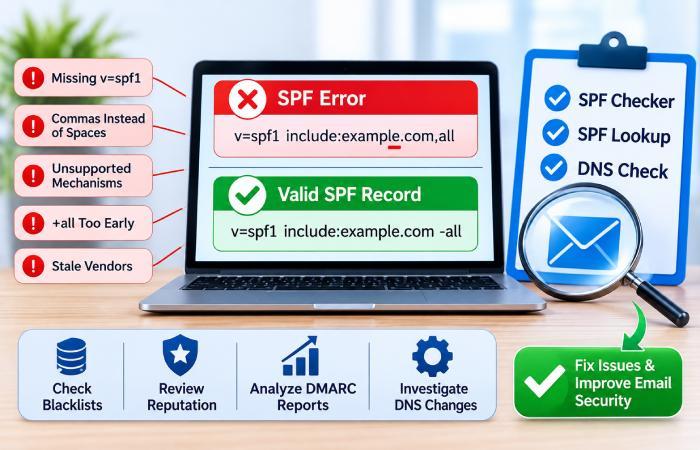
SPF syntax problems are also common. Examples include missing v=spf1, using commas instead of spaces, adding unsupported mechanisms, or placing the all mechanism before other senders. A reliable spf record generator reduces these mistakes by enforcing correct syntax before you publish changes to DNS.
Other issues include stale vendors, broad IP ranges, unnecessary +all, and records copied from unrelated domains. These errors weaken email security and may affect email delivery. Regular diagnostics with an spf record checker, spf lookup, and spf check can reveal problems before mailbox providers penalize your messages.
Administrators should also watch blacklists, review reputation monitoring, and correlate SPF failures with DMARC reports. If failures increase suddenly, check for DNS propagation delays, compromised services, unauthorized senders, or changes in your mailer’s infrastructure. If the problem is unclear, contact support for the vendor or platform involved.
Best Practices for Testing, Updating, and Maintaining SPF Records
SPF is not a one-time setup task. Your domain changes as new services are added, old tools are retired, and business units adopt new communication platforms. Maintaining an accurate SPF record requires periodic review, testing, and monitoring.
Use an SPF record generator when adding a new sender, but always validate the result before publishing. After updating DNS, run an spf check and confirm the new record through a trusted spf record checker. Then send test messages and review authentication results in the message headers. If possible, compare results across major mailbox providers to catch inconsistent behavior.
Testing workflow for reliable email delivery
A practical testing workflow should include:
- Generate or update the SPF record using a trusted spf record tool.
- Publish the TXT value in your DNS manager.
- Confirm propagation with DNS Lookup or another dns lookup utility.
- Run an spf record checker and SPF Record Raw Checker.
- Send test messages and analyze headers for SPF pass, DKIM pass, and DMARC alignment.
- Review Email Health, DMARC aggregate reporting, and alerting for failures.
- Monitor blacklists, sender reputation, and authentication trends over time.
For larger organizations, API-based integration with internal tools, including an AutoSPF checker, can automate checks across many domains. Combining SPF testing with DMARC, DKIM, BIMI, Threat Intelligence, Sender Insights, and Reputation Monitoring provides a broader view of email authentication health.
Finally, document every approved sender and update the SPF record whenever your email infrastructure changes. Consistent documentation, scheduled diagnostics, and managed controls help preserve email delivery while strengthening email security across every domain you operate.